Your Mac has 82 GB you're not using.
CuyCleaner finds what's taking up space, explains every number, and moves it to the Trash only when you say so. Nothing is deleted: if you change your mind, you get it back from Finder.
v1.0.34 · 18 MB · Apple silicon and Intel · signed and notarized by Apple · 30 days of Pro, no card
- System36.4 GB
- Apps and documents600.4 GB · never touched
- Regenerable caches41.3 GB
- Xcode and simulators38.1 GB
- Forgotten downloads2.6 GB · 267 files
- Free275.9 GB
Cleaning a Mac shouldn't be scary.
Many cleaners delete first and explain later. CuyCleaner does it the other way around.
-
Measure
It scans caches, downloads, duplicates and developer tools. Read-only: nothing changes in this step.
-
Explain
Every item says what it is, how much space it takes, whether it regenerates on its own, and what would happen if you remove it. Safe items come checked; doubtful ones don't.
-
Move to Trash
Only what you choose, and it's logged in the history with date and size. Until you empty the Trash, everything can be restored.
Everything that takes up space, in one place.
Scanning is free, with no time limit. Features marked PRO are included during the 30-day trial.
Disk
Where your space went and what you can get back safely.
Regenerable caches
npm, pip, Gradle, browsers and system caches, measured one by one and sorted by risk.
True duplicates PRO
Compares content byte by byte, not names. Always keeps the oldest copy.
Disk map and largest files
Interactive rings to see what each folder takes up and dive in with a click, plus large files, installers and forgotten node_modules.
What grew
Compares your disk day by day and explains which folder filled up and why: AI models, simulators, caches or downloads.
Unused PRO
What you haven't opened in months in Downloads, Desktop or the folders you choose, sorted by size.
Hidden space
Why Finder shows a different number: purgeable space, Time Machine snapshots and swap.
Cloud without local copies PRO
iCloud Drive, Dropbox, Google Drive or OneDrive files you haven't opened in months: keep them only in the cloud, without deleting anything.
An uninstaller that leaves no trace PRO
Removes apps with everything they store. And if you delete one from Finder, CuyCleaner instantly tells you what it left behind.
Development
Built for people who code: this is where tens of GB tend to hide.
Xcode, item by item PRO
Keeps the latest iOS version and suggests the old ones, the builds you don't touch and old archives.
Simulators PRO
iOS versions no simulator uses and test simulators created by tests and scripts. On the sample Mac, 26 GB in eight forgotten simulators.
Ports and orphaned processes PRO
Which program listens on each port, which project it comes from and how long it's been open. Shut down servers that got stuck.
Docker and Homebrew PRO
Build cache, stopped containers and old versions. Never touches your volumes.
App leftovers PRO
What apps you already uninstalled left behind, with a warning when something might still be in use.
Health and system
Read straight from the hardware and macOS, with nothing else to install.
Mac battery
Capacity versus the original, cycles, temperature and history since it left the factory.
SSD lifespan
Remaining life, terabytes written and disk errors, from the same data manufacturers use.
iPhone and iPad PRO
Battery health over cable or Wi-Fi, with a day-by-day history.
Memory without myths
The real pressure macOS calculates, which app actually uses it and when a restart helps.
Login items PRO
Everything that starts on its own, with who signed it. Flags leftovers from deleted apps and anything suspicious, and turns them off without deleting anything.
Menu bar monitor PRO
CPU, RAM and network next to the clock, in two compact lines with a graph.
Automation
Keep your Mac tidy without having to remember.
Automatic rules PRO
Forgotten downloads, installers already used and old screenshots, with a preview before you turn them on.
Health alerts PRO
An alert when the battery or SSD crosses a wear threshold, never twice for the same one.
Weekly summary PRO
Every week, what you freed up and the space you have left.
Your AI assistant PRO
Claude, Cursor and other MCP-compatible assistants can check your Mac and suggest what to clean. How it works
Ask your assistant why your Mac is slow.
CuyCleaner includes an MCP server: Claude, Cursor and other compatible assistants read your Mac's real state and suggest what to do. You approve every step, and everything goes to the Trash.
Skill for Claude
Teaches Claude to check your Mac like a technician: diagnosis, jargon-free explanations and cleanup by risk level.
cuycleaner-mac-care.zip · 4 KB
My Mac is slow and I only have 40 GB left. What should I do?
● cuycleaner · memory_report
● cuycleaner · list_cleanable
Chrome is using 12 GB, half your RAM, across 84 processes: closing tabs will make the biggest difference. There's also 17 GB of swap from two days ago that a restart will free.
On disk I found 22.9 GB that's safe: 18.2 GB of Xcode symbols and 4.7 GB of npm cache. Should I move them to the Trash?
Yes, both.
✓ move_to_trash · 22.9 GB in the Trash
-
Connect
In CuyCleaner, Settings → AI assistants: one click for Claude Desktop, or copy the configuration for Claude Code, Cursor or VS Code.
-
Ask
“How's my battery?”, “Free up 20 GB without touching my projects”, “What starts automatically at login?”.
-
Approve
The assistant shows you the list with sizes. Only what you confirm gets moved, and only what CuyCleaner found: it can't make up paths.
Screenshots of the app, untouched.
The screenshots show the app in Spanish; it runs in English when your Mac is set to English.
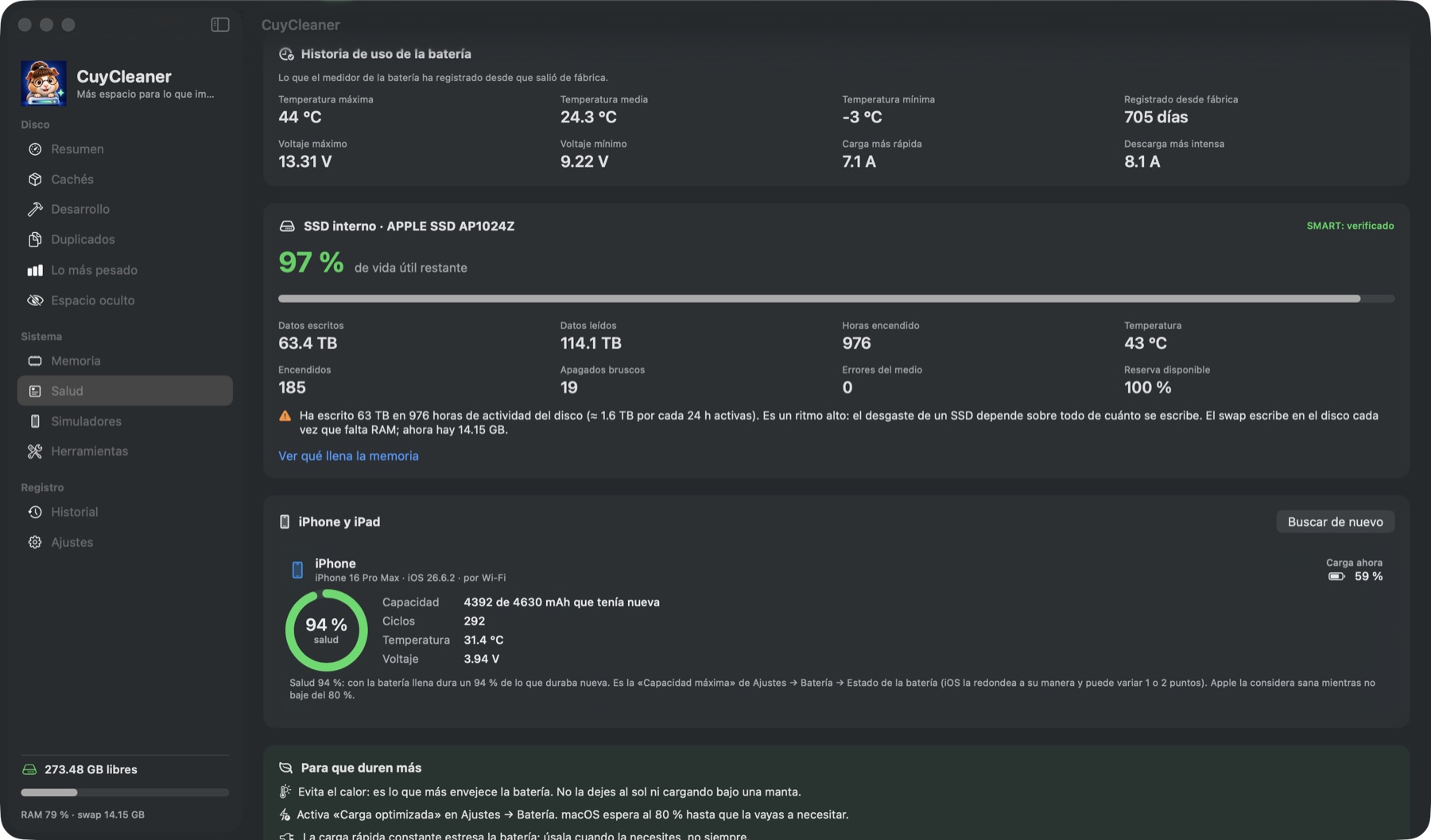
Your SSD and iPhone, with data from the hardware.
iPhone battery health is read over Wi-Fi through the connection Xcode already uses. Nothing to install on the phone.
SSD 97% life · iPhone 94% · 292 cycles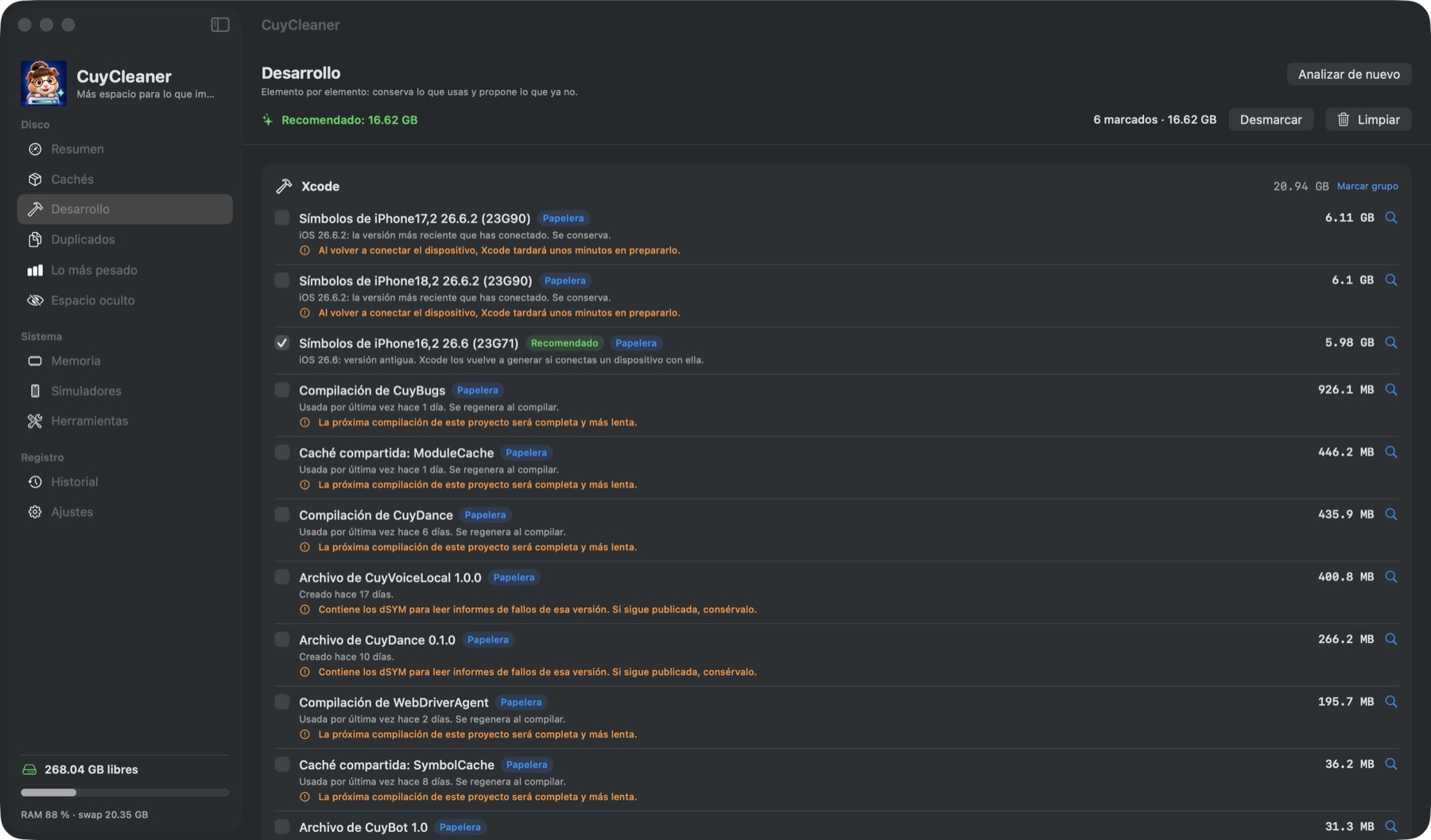
Suggests what's old and keeps what you use.
Each item tells you whether it goes to the Trash or is removed by its own tool, and what you lose by removing it.
16.62 GB recommended on this Mac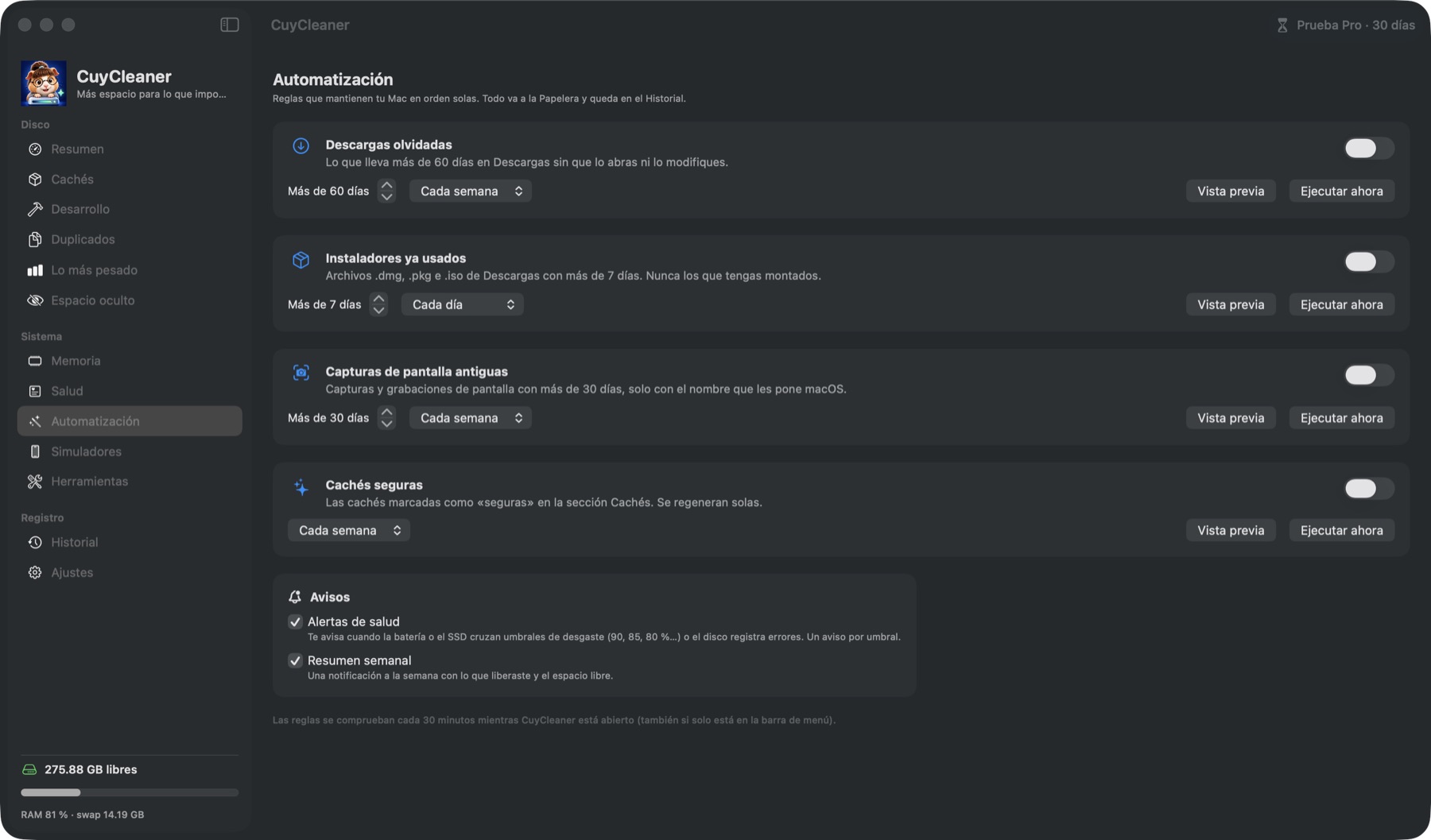
Rules with a preview.
Before turning on a rule you see exactly what it would move. They come switched off: you turn them on.
Checks every 30 min · everything is logged in the historyScanning is free. Pro starts at $1.49.
A simple subscription you can cancel anytime. When it ends, the app keeps working in its free version.
Free
- Full disk scan
- Cleanup of regenerable caches
- Mac health, memory and low-space alerts
- 30 days of Pro included, no card
Pro
−50% the first year- Everything in Free
- Cleanup of duplicates, large files and app leftovers, with alerts when you uninstall
- Free up space from iCloud Drive, Dropbox and Google Drive
- Developer tools: Xcode, simulators, Docker, Homebrew
- iPhone and iPad health, alerts and automatic rules
- Login items and connection with your AI assistant
- Up to 3 Macs per license
Annual subscription: renews automatically every year at $19.99 plus tax until you cancel. You can cancel anytime from your receipt or the app, and you keep Pro until the end of the paid period.
By subscribing you accept the terms, the privacy policy and the refund policy.
Secure payment with Dodo Payments. You'll get your key instantly and by email.
Launch offer: 50% off for the first 12 months, on both plans, for subscriptions started by December 31, 2026. The regular price applies afterwards.
Prices in US dollars, excluding tax: your country's taxes are calculated and shown at checkout. The annual plan saves 44% compared with twelve single months. Payments are processed by Dodo Payments, the Merchant of Record, which handles taxes and invoices. The subscription renews automatically until you cancel. Annual plan with a full refund if you ask within 14 days of purchase; the monthly plan can be cancelled anytime (refund policy).
What people usually ask before downloading.
Can it delete something important?
It doesn't delete: it moves things to the Trash. Your documents, photos and settings are protected by default, and every path is checked again right before it's moved. Only a few third-party tools (Homebrew, Docker, Xcode runtimes, simulators) remove their own data, and the app warns you first.
What happens when the 30-day trial ends?
The app keeps working in its free version: it scans everything and cleans regenerable caches. Pro features ask for a subscription. Nothing gets locked and no data is lost.
Does it send my files or data anywhere?
No. Everything is analyzed on your Mac. Only when activating or checking a license does it contact our license service, sending the key, the Mac model and an anonymous device fingerprint, nothing else.
What does connecting CuyCleaner to my AI mean?
MCP is a standard that lets assistants like Claude use tools on your Mac. CuyCleaner works as one of those tools: the assistant can read disk space, memory, battery and login items, and suggest a cleanup that you approve. The connection is local and CuyCleaner doesn't send anything to any server, but what the assistant reads becomes part of your conversation with it and is governed by that service's terms. It's optional and off by default.
Why isn't it on the App Store?
App Store apps can't read SSD health, connect to your iPhone or clean developer tools. To offer all of that, CuyCleaner is distributed from here, signed and notarized by Apple, like other well-known Mac apps.
Is the app in English?
Yes. CuyCleaner follows your Mac's language: English, or Spanish if your Mac is set to Spanish. You can also choose it in Settings → Language.
How do I cancel my subscription?
From the customer portal (sign in with your purchase email), from the link in your receipt, or in the app under Settings → License → Manage subscription. Choose “cancel at the end of the period” and you keep Pro until what you paid for runs out.
Will it run on my Mac?
It needs macOS 14 Sonoma or later. It runs on Macs with Apple silicon and with Intel.

Download CuyCleaner 1.0.34
Open the file, drag CuyCleaner to Applications, and you're done. Signed with Developer ID and notarized by Apple.
SHA-256 · d0f806f5adf95b59c0793be0af321b920ee08e145c5fa1fb83541a788e0700dc